Awwwards
404media is now part of Awwwards. Find our studio profile and work there.
(Announcement)
W.
404media is now part of Awwwards. Find our studio profile and work there.
We launched the new HBE Healthcare website.
We launched the new Property Partners website.
A building you can turn, an apartment you can click, a floor plan one tap away. How a 3D apartment finder works, what you need to provide and when a 2D version is the smarter choice.
 Patryk WisniewskiLead developer
Short answer: a 3D apartment finder is a model of your building that runs in the web browser. A buyer turns the building, clicks an apartment and sees its floor plan, area, status and enquiry form, without a call to the sales team. It needs no app or plug-in and works on a phone. You keep status and prices current in one place, and for projects where a 3D model is more than the budget needs, a 2D finder built from floor plans does much the same job.
Developers tell us that the same question reaches the sales team over and over: which apartments are still available? A PDF list answers that, but not the questions that come right after: where in the house is it, how much sun does the terrace get, is it the one at the back? This article explains how a finder works, what it takes to build one and what it can and cannot do. We do not quote prices or sales results here, because they depend on each project; our apartment finder page and a free call give you a figure for yours.
Where the project supports it, the finder can add an hour-of-the-day sun slider, renderings and 360° tours at the floor plan. The example we show is the Kleine Reißzeugfabrik, Zehenthofgasse 20+22 in Vienna-Döbling: 13 owner-occupied apartments from the ground floor to the third attic floor. See it at the project.
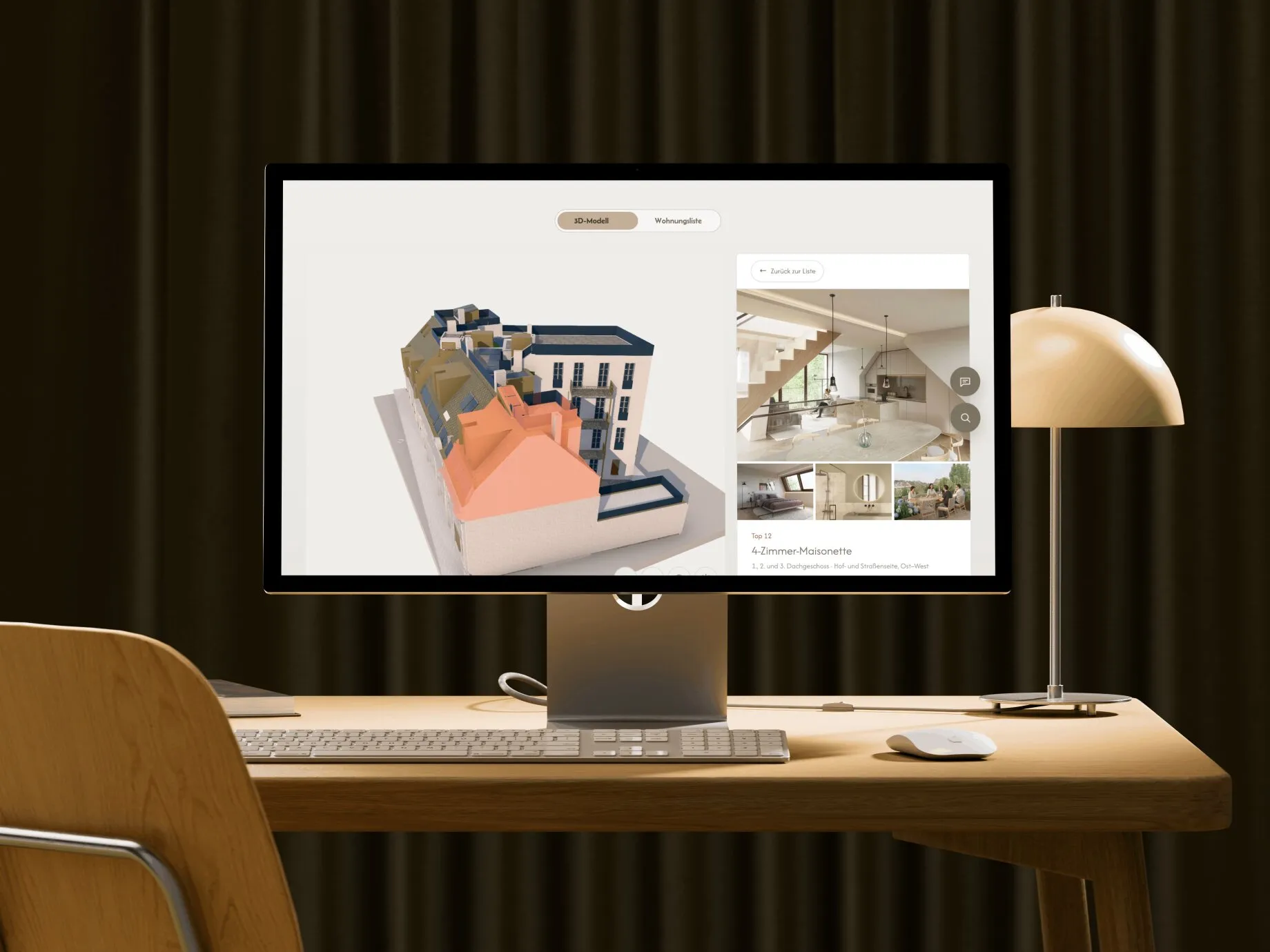
The model is drawn directly in the browser using WebGL, through the open-source three.js library. That is why the visitor needs no plug-in, and why it also works on a phone. The finder is part of the project website, not a separate app, so it uses the same domain, tracking and design. We build the sites on Next.js, which keeps the page itself fast and readable for search engines; the 3D model loads on top of it.
On a phone the controls are designed for touch: the model turns with one finger without the page scrolling away, and filters and floor plans have their own mobile layout rather than a shrunken desktop view.
Timeline from our experience: a first version of a 2D finder after two to three weeks, a 3D model four to six weeks once the plans are available. Projects differ, so we confirm this in the first call.
We do not promise sales figures, but these effects follow directly from how the finder works:
| 2D finder | 3D finder | |
|---|---|---|
| Built from | Floor plans | Architect’s model or plans, modelled in 3D |
| How the buyer chooses | Select a floor, click a unit | Turn the building, click an apartment |
| First version | About 2–3 weeks | About 4–6 weeks once plans are available |
| Strong when | Standard layouts, many similar units, tight schedule | Distinctive building, view or terraces matter, premium positioning |
| Example | Mengergasse 11, from studios to townhouses | Kleine Reißzeugfabrik, 13 apartments |
Our advice: start from the project, not the technology. A tidy 2D finder on a small development often does the job, and a 3D model pays off where the building itself is the argument. The finder is also not a replacement for a good project site; see website for property developers for the whole picture.
You can change status and price in the browser, or keep working in the system you already use. With Justimmo, the finder takes status, prices and areas from there, so you do not enter details twice. For Wolf & Sohn and Hyatt Immobilien the search, expose and detail views run directly from Justimmo. Other broker software is possible on request.
Send the floor plans and the unit list. We tell you whether 2D or 3D is faster, what it costs and when the finder can be online. Book a free call or get in touch.
It depends on whether you choose a 3D model or 2D floor plans and how many units there are. A 2D finder for a project with a dozen apartments is clearly cheaper than a full building model. We give a figure in the free first call.
Yes. The model runs in the phone’s browser without an app, turns with one finger without scrolling the page away, and filters and plans have their own mobile layout.
Yes. In a browser login, or in your broker software if it is connected, for example Justimmo. The site shows the new state straight away.
Usually yes. We either attach it as its own page on your domain or embed it in the existing project page. In the first call we look at what your site runs on and tell you which route is less work.
We can build the 3D model from your submission or sales plans. Each apartment gets its own volume so it can be selected.
More lessons from our projects in Vienna.
Real estate • • 10 min read
 Christoph Speiser
Real estate • • 11 min read
Christoph SpeiserWebsites • • 9 min read
Patryk WisniewskiTell us about your project. Christoph gets back to you personally.
Christoph Speiser, Project lead & sales